Hey there, BBS students! The wait is finally over or at least it’s getting close. If you’ve been anxiously refreshing your browser for the BBS 1st Year Result 2081, Tribhuvan University (TU) has got you covered. They’ve made it super easy to check your scores online via their official exam portal, tuexam.edu.np (TU, 2025). Whether you’re after the latest 2081 results or need to peek at last year’s 2080 marks, this blog post will walk you through the process step-by-step. Let’s dive in!
A Quick Look at the Basics
Before we get into the “how-to,” here’s what you need to know about bbs 1st year result 2081:
- Who’s Behind It: Tribhuvan University
- What: BBS 1st Year Annual Exam
- When: 2080 result dropped on September 30, 2024; 2081 result is rolling out as of aug 2025 (check for updates)
- Where: tuexam.edu.np or tu.bbsresult.com
Step-by-Step: Checking Your BBS 1st Year Result
Ready to see how you did? Follow these simple steps to access your BBS 1st Year Result 2081 (or 2080) along with your marksheet:
- Head to the TU Exam Portal
Fire up your browser and go to tuexam.edu.np. This is TU’s official spot for all exam results (TU, n.d.). - Find the Results Section
Once you’re on the homepage, look for something like “Examination Result Table.” It’s your gateway to all the good stuff (tu.bbsresult.com, 2025). - Pick Your Result
Scroll through the options and click on “BBS 1st Year Result 2081” (or 2080 if you’re checking last year’s scores). - Enter Your Info
Now, you’ll need your symbol number and date of birth. Got your admit card nearby? That’s where you’ll find your symbol number. Double-check everything before moving on (tu.bbsresult.com, n.d.). - Hit Submit and Celebrate (or Strategize)
Click “Submit,” and boom—your result and marksheet will pop up. Download it or print it out so you’ve got a copy handy.
or you can follow this quick steps :
How to Check Your Result
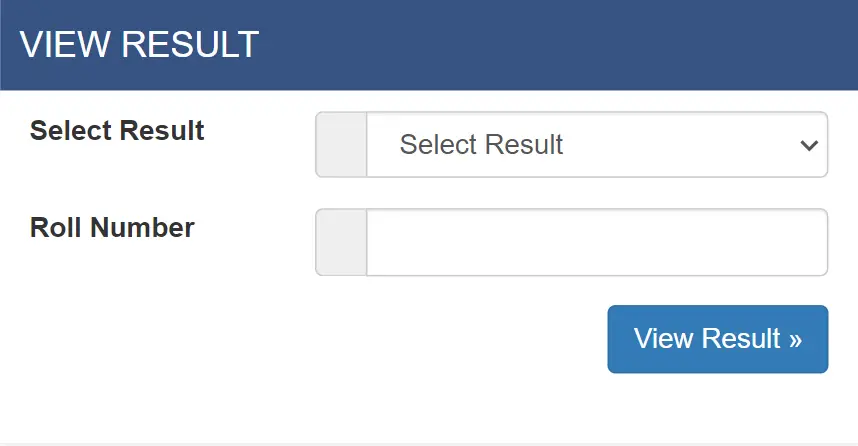
- Visit the Site: Go to tu.bbsresult.com
- Find the Result: Look for “BBS 1st Year Result 2081” in the results section.
- Enter Details: Type your symbol number and date of birth.
- Submit: Hit “Submit” to see your marksheet.
- Save It: Download or print your result for safekeeping.
What’s on Your Result?
Curious about what you’ll see? Your BBS 1st Year Result comes loaded with details like:
- Your university and college name
- Your name and symbol number
- Marks for each subject (theory + practical)
- Total marks and whether you passed or not (tuexam.edu.np, 2025)
It’s like a report card, but fancier.
What’s New?
- 2080 Update: TU dropped the 2080 results on September 30, 2024 (14th Ashoj 2081).
- 2081 Update: As of today, March 6, 2025, the 2081 results are either out or on their way. Keep an eye on tuexam.edu.np for the latest (TU, 2025).
Stuck? Here’s What to Do
Sometimes things don’t go as planned. No stress—here’s how to handle it:
- Website Crashing? Traffic can bog down tuexam.edu.np when results drop. Give it a few minutes and try again (TU, n.d.).
- Didn’t Pass? You’ve got options—apply for a re-exam or request a re-totaling. Results for those get posted later (tu.bbsresult.com, 2025).
- Wrong Info? If your result won’t load, make sure your symbol number and birth date are spot-on.
A Few Handy Tips
- Dig out your admit card before you start—it’s your golden ticket.
- Use a solid Wi-Fi connection so you don’t get stuck mid-check.
- Want more info? Swing by tu.bbsresult.com for extra details on TU results (tu.bbsresult.com, 2025).
Why Go Online?
Checking your BBS 1st Year Result online is a game-changer. No trekking to campus or waiting in lines just a few clicks and you’re in the know (TU, 2025). Whether you’re celebrating a win or planning your next move, it’s all right there at your fingertips.
So, what are you waiting for? Hop over to tu and check your results. Fingers crossed for awesome scores!
References
- TU. (2025. Tribhuvan University Official Website. Retrieved from https://tu.edu.np/.
- tu.bbsresult.com. (2025). TU Result. Retrieved from https://tu.bbsresult.com/tu-result/.